Stop switching between Shopify and Klaviyo. Ask Claude once.
62 ready-to-run prompts. Reads your Shopify catalog and Klaviyo events at the same time. Returns decisions, segments, email copy, and ad briefs with a fixed output contract. Free.
Unsubscribe with one click.
Reads from


 Claude
 The skill at a glance
Free
62
Named prompts
9
Domains
33KB
File size
- 01 Catalog & Taxonomy 12
- 02 PDP & Content 5
- 03 Scoring & Segmentation 6
- 04 Retention & Lifecycle 7
- 05 Email & Flows 10
- 06 Acquisition & Ads


 7
7 - 07 Analytics & Reporting 3
- 08 Merchandising, Collections & Pricing 6
- 09 Agent Readiness & Audits 6
What is a Claude Skill?
Three things to know before you install it.
01 · What it is
A bundle of markdown.
A .skill file is a ZIP archive containing a SKILL.md and reference files. Not code. Not a plugin. No dev setup, no API keys, no config.
02 · How it works
Install once. Ask in plain language.
After install, Claude reads your intent, matches it to a named prompt inside the Skill, fills the variables, and runs. You do not paste prompts.
03 · Why it matters
Fixed output contracts.
Every one of the 62 prompts ships with an output contract. Two operators running the same prompt get the same shape of answer, so results stay predictable across your team.
Install in 3 steps.
From email to first prompt in about 90 seconds.
Get the .skill file.
Drop your email at the top of this page. The .skill file arrives in your inbox within 60 seconds, attached to a delivery email from noreply@getatomz.com. Save the attachment to disk. You are also added to the weekly issue list — unsubscribe with one click.
▼ Inbox · noreply@getatomz.com
Your skill: The Agentic Operator
The Agentic Operator is attached to this email as a .skill file. 62 production prompts for running a Shopify store on its own data.
📎 the-agentic-operator.skill · 33 KB
Upload the .skill file.
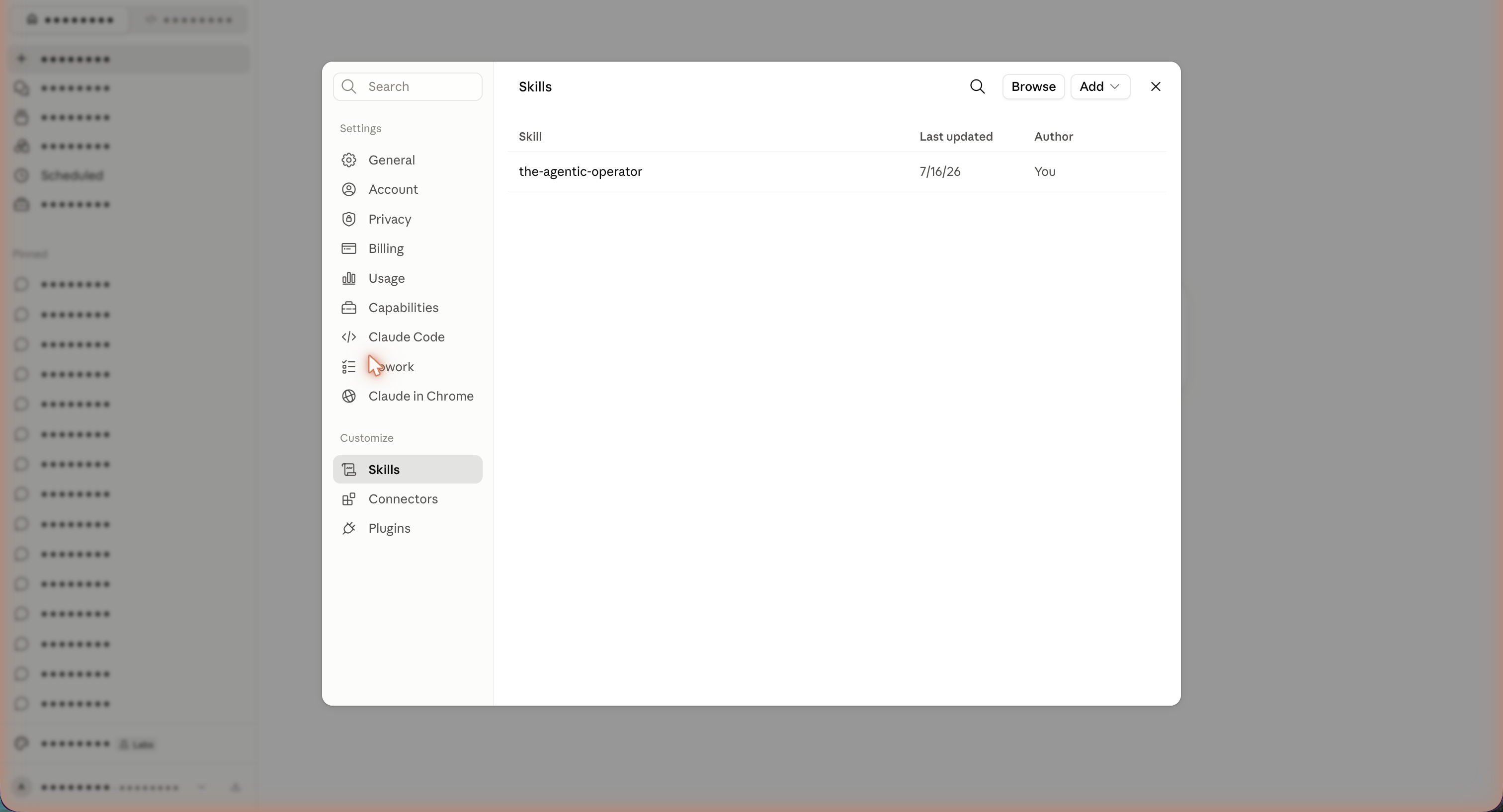
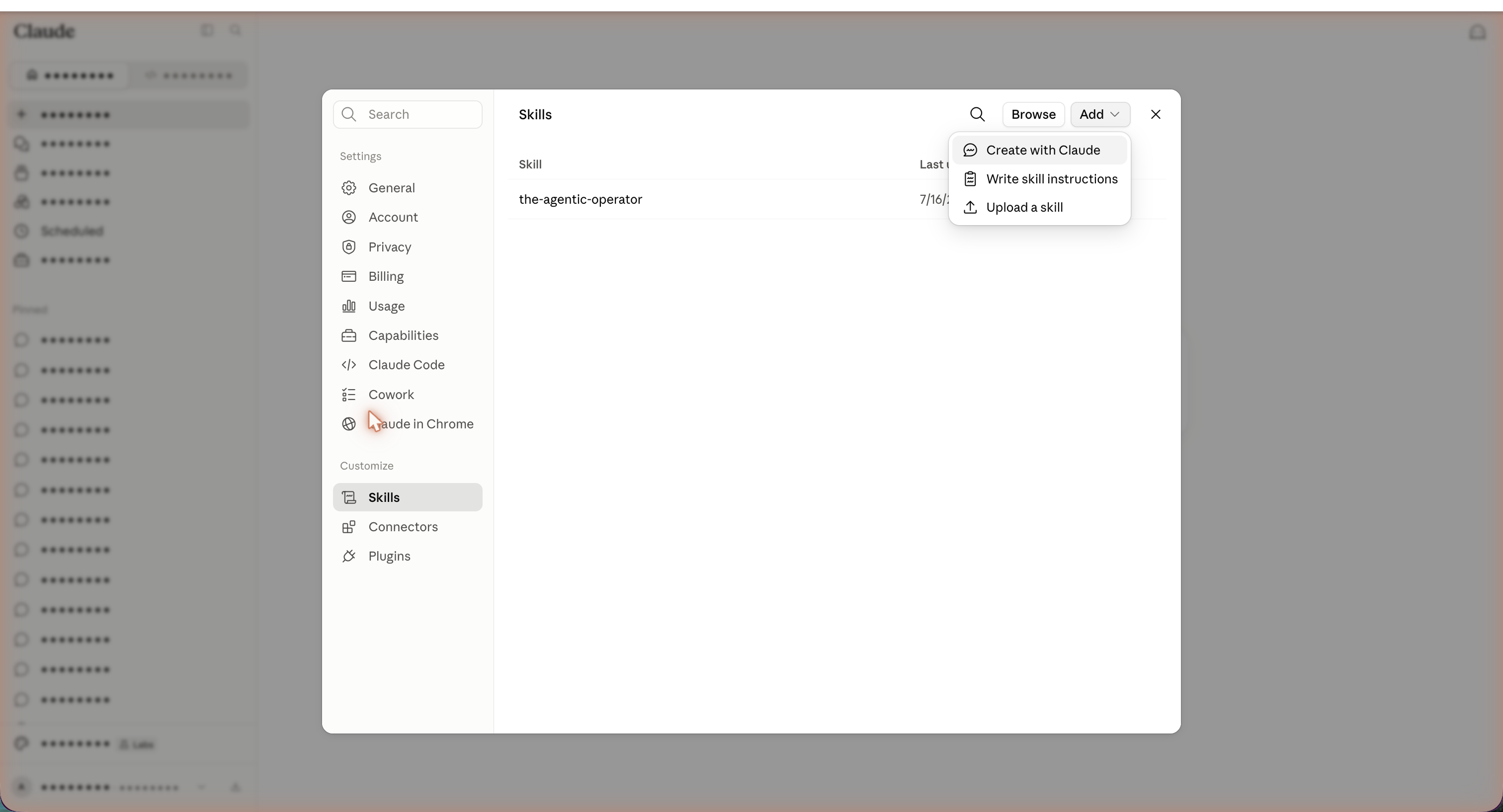
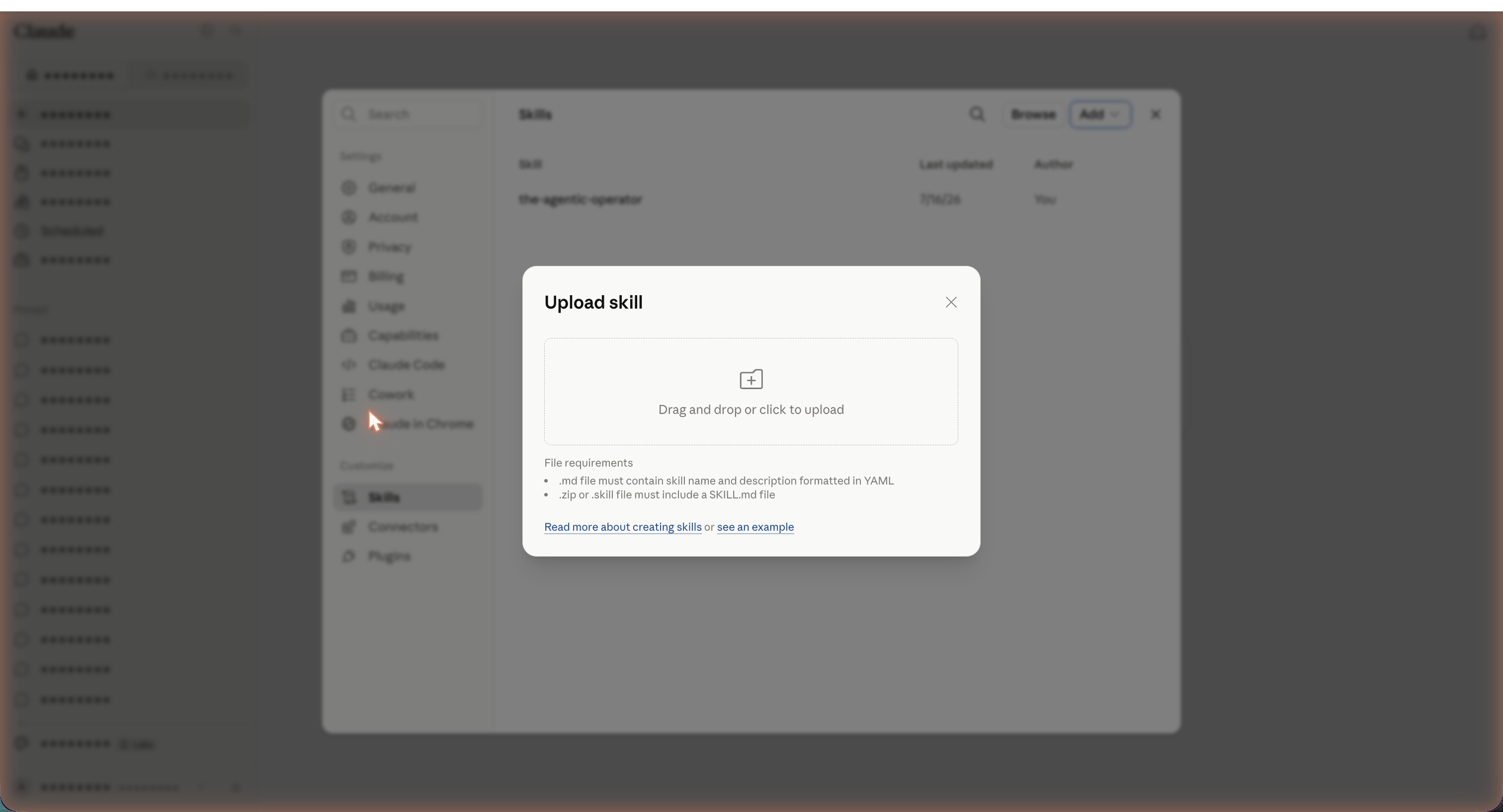
Open Claude.ai → Settings → Customize → Skills → Add → Upload a skill. Drop the .skill file in the upload zone. The skill is available in every new conversation immediately.
Works on Claude Free, Pro, and Team. Team and Enterprise admins can install it once for everyone.
Unzip into your skills directory.
Claude Code reads skills from ~/.claude/skills/. Unzip the .skill file directly into that directory so the SKILL.md sits at ~/.claude/skills/the-agentic-operator/SKILL.md. Restart Claude Code. The skill loads on every session.
$ unzip ~/Downloads/the-agentic-operator.skill -d ~/.claude/skills/
Archive:  the-agentic-operator.skill
   creating: the-agentic-operator/
  inflating: the-agentic-operator/SKILL.md
  inflating: the-agentic-operator/references/00-command-index.md
  inflating: the-agentic-operator/references/01-catalog-taxonomy.md
  ... 8 more reference files

$ ls ~/.claude/skills/the-agentic-operator/
SKILL.md    references/
Type it like a shell. It maps you to the right prompt.
You do not memorize 62 prompt names. Type help to see the menu, ask in plain language, or ask something ambiguous and it suggests the closest match.
Welcome to The Agentic Operator, maintained by Ankit Minocha.
Connect Shopify and Klaviyo, ask in plain language, get a decision back.
62 prompts across 9 domains. Say any of them and I will run the matching one.

01  Catalog & Taxonomy        (12)    try: "catalog completeness scorecard"
02  PDP & Content             (5)     try: "human-vs-agent page teardown"
03  Scoring & Segmentation    (6)     try: "full-base predictive scorecard"
04  Retention & Lifecycle     (7)     try: "winback wave planner"
05  Email & Flows             (10)    try: "campaign brief from a segment"
06  Acquisition & Ads         (7)     try: "lookalike seed builder"
07  Analytics & Reporting     (3)     try: "weekly store scorecard"
08  Merchandising, Collectio  (6)     try: "collection gap and overlap audit"
09  Agent Readiness & Audits  (6)     try: "full-store agent-readiness scorecard"

To see every prompt in a domain, say "list 03". That does not map to a prompt yet. Did you mean: - "catalog completeness scorecard" 01, one number for how agent-ready your catalog is - "attribute gap finder" 01, buyer-facing attributes missing, ranked by impact - "agent readiness scorecard" 09, one score for how legible your store is to agents Say one of those, or "help" for the full menu.
All 62 prompts, ready to copy.
Every prompt below is what runs inside the skill when you say it in plain language. You can also copy any prompt and paste it into a plain Claude conversation without installing the skill. Every one ships with a fixed output contract.
Catalog & Taxonomy
An agent can only match a product it can read, so these prompts find the gaps in your product data, fill them, and map the catalog to a taxonomy an agent understands.
01.1
Catalog completeness scorecard
- When to use
- You want one number for how agent-ready the whole catalog is, plus where the holes are.
- Inputs
{{store}},{{required_attributes}}(default: title, description over 40 words, product type, vendor, at least 3 tags, price, at least 1 image, at least 5 structured attributes/metafields).
For {{store}}, score catalog completeness across all products. For each product, check whether it has each of these required fields populated with a real value: {{required_attributes}}. A field stuffed with a placeholder ("N/A", "-", "default") counts as missing. Produce a per-field fill rate across the catalog and an overall completeness score (average fill rate across all fields). Then list the 20 products with the lowest completeness, worst first.Output contract
- Line 1:
Catalog completeness: XX.X% across {{N}} products - Table A
Field fill rates: columnsField | Filled | Total | Fill rate %, sorted by fill rate ascending (worst field first). - Table B
Lowest 20 products: columnsProduct | Missing fields | Completeness %, sorted by completeness ascending, ties broken by product title A→Z. - Close with the
Data gapsline if any field could not be read.
01.2
Attribute gap finder
- When to use
- You know products are thin but want the specific attributes to add, ranked by impact.
- Inputs
{{store}},{{category}}(optional, default all),{{buyer_attributes}}(the attributes a shopper or agent filters on, e.g. size, material, skin type, concern, active ingredient, use case, fit, flavor).
For {{store}} in category {{category}}, identify the buyer-facing attributes that agents and shoppers filter on but that are missing from product data. Compare each product against this attribute set: {{buyer_attributes}}. For each attribute, report how many products are missing it. Rank attributes by number of products missing it times how often that attribute is used to filter, so the gap that would move the most products sits first. Each filled attribute is one more match point, so treat fill rate as revenue work rather than housekeeping.Output contract
- Table
Attribute gaps: columnsAttribute | Products missing | Fill rate % | Priority, sorted by number missing descending, ties by attribute name A→Z. Priorityis High if fill rate under 40%, Medium if 40–75%, Low if over 75%.- Line at end:
Top fix: populate <attribute> on <N> products.
01.3
Structured payload rewrite
- When to use
- A product reads like marketing copy and you want the agent-legible version alongside it.
- Inputs
{{product}}(title or ID),{{attribute_schema}}(the fields to extract, default: category, core function, key ingredients/materials, target use, target buyer, size/format, differentiators, exclusions).
Take the product {{product}} from the store. Read its current description. Produce two things side by side: the marketing copy as it stands, and a structured payload an agent can parse, using this schema: {{attribute_schema}}. The payload should be flat key-value pairs, machine-readable, no prose. Where the current copy implies a value without stating it, extract it. Where a value is genuinely absent, mark it needs-input. Show the contrast so it is obvious how differently a human and an agent read the same page.Output contract
- Section
Marketing copy: the current text, verbatim, quoted. - Section
Structured payload: a fenced code block ofkey: valuelines, one attribute per line, in schema order. - Any absent value written as
key: needs-input. - No commentary between or after the two sections.
01.4
Taxonomy mapper
- When to use
- Your product types are a mess and you want them mapped to a clean, consistent taxonomy.
- Inputs
{{store}},{{target_taxonomy}}(default: Shopify Standard Product Taxonomy; can be Google Product Category or a custom tree).
For {{store}}, map every product's current product type and tags to {{target_taxonomy}}. For each product, output its current type, the mapped category path, and a confidence level. Flag products where the current type is blank, ambiguous, or maps to more than one branch. Group the flags so I can fix the taxonomy in batches rather than one product at a time.Output contract
- Table
Taxonomy map: columnsProduct | Current type | Mapped path | Confidence, sorted by confidence ascending (least certain first). Confidenceis High, Medium, or Low.- Section
Needs review: bullet groups of products sharing the same ambiguity, each group headed by the reason. - Line:
Mapped with High confidence: N of {{total}}.
01.5
Variant and option normalizer
- When to use
- Sizes, colors, and options are spelled five different ways and an agent can't group them.
- Inputs
{{store}},{{option_dimensions}}(default: size, color, material, flavor, pack count).
For {{store}}, audit variant option names and values across {{option_dimensions}}. Find inconsistencies: the same value written differently (e.g. "L", "Large", "lg"), option names that vary product to product, and values in the wrong dimension. Propose one canonical form per value and show every raw form that should collapse into it.Output contract
- Table
Normalization map: columnsDimension | Canonical value | Raw variants collapsing in | Products affected, sorted by products affected descending. - Line:
Total variant values reduced: from X raw to Y canonical.
01.6
Duplicate and near-duplicate finder
- When to use
- You suspect the same product exists under multiple listings, splitting reviews and inventory.
- Inputs
{{store}},{{match_basis}}(default: title similarity, shared images, matching SKU root, near-identical description).
For {{store}}, find duplicate and near-duplicate products using {{match_basis}}. Group suspected duplicates together, show why they matched, and recommend which listing to keep as canonical based on which has the most orders, reviews, and complete data. Do not recommend deletion, only consolidation candidates.Output contract
- Section per duplicate group headed
Group N: columnsProduct | Orders | Reviews | Completeness % | Keep as canonical?. - One product per group marked
Yesunder keep, the restMerge. - Line at end:
Suspected duplicate groups: N covering M products.
01.7
Missing product finder (unfindable audit)
- When to use
- You want to know which products no agent would ever surface, because unfindable is missing.
- Inputs
{{store}},{{findability_signals}}(default: has product type, 3+ tags, description over 40 words, at least 5 attributes, in at least one collection, has an image with alt text).
For {{store}}, run an unfindable audit. A product is unfindable if it fails enough of these signals that an AI shopping agent could not confidently match it to a query: {{findability_signals}}. Score each product on how many signals it passes. List the products most likely to be invisible to agents, worst first, and name the single fastest fix for each.Output contract
- Line 1:
Unfindable (fails 3+ signals): N of {{total}} products. - Table
Unfindable products: columnsProduct | Signals passed / total | Fastest fix, sorted by signals passed ascending, ties by title A→Z, capped at 30 rows. - Line: if more than 30,
Plus M more below the cap.
01.8
Feed readiness check
- When to use
- Before syndicating the catalog to Google, Meta, or an agent marketplace.
- Inputs
{{store}},{{feed_spec}}(default: Google Merchant Center required + recommended fields).
For {{store}}, check every product against {{feed_spec}}. Report which required fields are missing (these block the feed) and which recommended fields are missing (these lower match quality). Separate hard failures from soft ones so I fix blockers first.Output contract
- Section
Hard failures (block feed): tableField | Products missing | % of catalog, sorted by products missing descending. - Section
Soft gaps (lower match quality): same columns and sort. - Line:
Products feed-ready today: N of {{total}}.
01.9
Category assignment coverage
- When to use
- You want to know which products carry a taxonomy category and which are uncategorized, since an uncategorized product cannot be reached by category browse or by an agent navigating the tree.
- Inputs
{{store}},{{taxonomy}}(default: the platform's standard product taxonomy, e.g. Shopify Standard Product Taxonomy; can be Google Product Category or a custom tree).
For {{store}}, check every product for a {{taxonomy}} category assignment. Report the share of products with a category and list the ones with none. An uncategorized product is invisible to category browse and to an agent that navigates by category, so treat a blank category as an unreachable product. Group the uncategorized by the category that likely fits so they can be fixed in batches rather than one at a time.Output contract
- Line 1:
Category assigned: N of {{total}} ({{XX.X}}%). - Table
Uncategorized products: columnsProduct | Likely category, sorted by likely category then title A→Z. - Line:
Uncategorized: N.
01.10
Category attribute (metafield) fill gap
- When to use
- Assignment is only half the job, and this measures whether the category-specific attributes each category defines are actually populated, since those are what agents filter on inside a category.
- Inputs
{{store}},{{taxonomy}},{{placeholder_values}}(default: N/A, -, default, none, blank count as empty).
For {{store}}, measure the category attribute gap in two layers. Layer one: does each product have a {{taxonomy}} category assigned. Layer two: for each categorized product, how many of the attributes that category defines are populated with a real value, treating {{placeholder_values}} as empty. Report the share of categorized products with zero attributes filled, the average attributes filled per product, and a per-category breakdown so I can see where the emptiness concentrates. Category attributes are the fields an agent filters on inside a category, so an empty set means the product is a category match with nothing to confirm it. Do not confuse this with a raw metafield count. Only the attributes the assigned category actually defines count here.Output contract
- Line 1:
Category assigned: N ({{XX.X}}%). Assigned but zero attributes filled: M ({{YY.Y}}%). - Line 2:
Average category attributes filled: Z. - Table
By category: columnsCategory | Products | Avg attributes filled | % with zero filled, sorted by products descending (biggest category first). - Line:
Fix first: <the category with the most products and the lowest fill>. - Add the
Data gapsline if any category's attribute schema could not be read.
01.11
Category attribute fill order (per category)
- When to use
- You picked one category and want the exact attributes to fill, ranked by how many products miss each.
- Inputs
{{store}},{{category}},{{taxonomy}}.
For {{category}} in {{store}} under {{taxonomy}}, list every attribute that category defines. For each attribute, report how many products in that category leave it empty and its fill rate across the category. Rank by number of products missing it, so the attribute absent from the most products sits first. Each filled category attribute is one more way an agent can match this product to a query, so treat the fill order as a revenue queue rather than housekeeping.Output contract
- Table
Attribute fill order: columnsAttribute | Products missing | Fill rate % | Priority, sorted by products missing descending, ties by attribute name A→Z. Priorityis High if fill rate under 40%, Medium if 40–75%, Low if over 75%.- Line:
Start with: <attribute> (missing on N of M products).
01.12
Miscategorization detector
- When to use
- A wrong category offers the wrong attribute set, so the product can never be enriched correctly. This flags products whose category does not fit.
- Inputs
{{store}},{{taxonomy}}.
For {{store}}, find products whose {{taxonomy}} category looks wrong given their title, product type, and description. For example a kitchen tool filed under a garden branch, or a physical product filed as a service. List each suspect with its current category and the category that actually fits. A wrong category is worse than no category, because it offers attributes that do not apply and hides the ones that do, so an agent reads the product through the wrong lens.Output contract
- Table
Suspected miscategorization: columnsProduct | Current category | Better fit | Confidence, sorted by confidence descending (High → Low). Confidenceis High, Medium, or Low.- Line:
Suspected miscategorizations: N of {{total}}.
PDP & Content
A product page gets read once by a person and once by an agent, and most pages are written for the first reader while ignoring the second, so these prompts make the page work for both.
02.1
Human-vs-agent page teardown
- When to use
- You want to show, for one page, exactly what a shopper sees versus what an agent can extract.
- Inputs
{{product_url}}.
Take {{product_url}}. Read it the way a human does: what stands out, what the pitch is, what a person walks away knowing. Then read it the way an AI shopping agent does: what structured facts it can extract with confidence, and what it cannot determine because the page never states it plainly. List the gaps where a human infers something an agent cannot. State the mechanism, not the marketing.Output contract
- Section
What a human reads: 4–7 short lines, one thought per line. - Section
What an agent extracts: a fencedkey: valueblock of only the facts stated plainly enough to parse. - Section
Gaps (human infers, agent cannot): bullet list, each line naming the missing fact and why it matters for matching. - Close: one line distilling the single biggest fix.
02.2
PDP structured content block
- When to use
- You want a drop-in structured block to add to a product page so agents stop guessing.
- Inputs
{{product}},{{attribute_schema}}(default: category, core function, key ingredients/materials, target use, target buyer, size/format, what it is not).
For {{product}}, generate a structured content block to add near the top of the PDP, using {{attribute_schema}}. Output it as clean labeled pairs a shopper can skim and an agent can parse. Keep every value concrete and specific. If the product's current data does not support a value, mark it needs-input rather than inventing it.Output contract
- A single fenced block of
Label: valuelines in schema order. - Values are fragments, not sentences. One fact per line.
- Absent values as
Label: needs-input. - Nothing before or after the block.
02.3
Description rewrite (mechanism-first)
- When to use
- A description is all vibe and no substance.
- Inputs
{{product}},{{length}}(default: 90–140 words).
Rewrite the description for {{product}} in {{length}}. Lead with the mechanism: what it is, what it does, who it is for, how it works. Every claim must map to a concrete attribute. Cut adjectives that do not carry a fact. Keep the brand's register but make it legible to an agent. Do not use em dashes. Do not use the words elevate, unlock, leverage, seamless, transform, holistic, robust, curate.Output contract
- Section
Rewritten description: the prose, within the word count. - Section
Attributes surfaced: a fencedkey: valueblock listing every concrete attribute the new copy now states. - Line:
Word count: N.
02.4
Comparison table builder
- When to use
- Buyers and agents both need to tell your similar products apart.
- Inputs
{{product_set}}(a collection or list),{{compare_on}}(default: the attributes that actually differ across the set).
For {{product_set}}, build a comparison table across {{compare_on}}. Pick the dimensions that genuinely differentiate these products, drop the ones where they are all identical. The table should let a shopper or an agent choose between them on facts alone. Flag any dimension where a value is missing for one or more products, because a gap breaks the comparison.Output contract
- Table
Comparison: first columnAttribute, one column per product in the set. - Only rows where at least two products differ.
- Missing cells written as
MISSING. - Line:
Dimensions dropped as identical: N. Dimensions broken by a gap: M.
02.5
Buying-intent keyword coverage
- When to use
- You want to know which real buyer queries your page can and cannot answer.
- Inputs
{{product}},{{query_set}}(default: infer the top intent queries for this product's category).
For {{product}}, take the buyer queries in {{query_set}} (or infer the top ones for this category). For each query, decide whether the current page contains the fact an agent needs to confidently return this product as a match. Mark covered, partial, or missing. For every gap, name the exact attribute to add.Output contract
- Table
Query coverage: columnsQuery | Coverage | Missing fact to add, sorted Covered last so gaps surface first (Missing, then Partial, then Covered). - Line:
Queries fully covered: N of M.
Scoring & Segmentation
Instead of drawing named lists by hand, you score every customer and attach one decision to each threshold, because a segment is really a threshold on a live score rather than a folder someone made back in 2020.
03.1
Full-base predictive scorecard
- When to use
- The foundation. Score every customer before doing anything else.
- Inputs
{{esp}}(Klaviyo or equivalent),{{fields}}(default: churn probability, predicted CLV, historic CLV, historic order count, average days between orders, expected date of next order).
Pull every customer profile from {{esp}} that has predictive data. For each, return {{fields}}. Do not bucket into named segments yet. I want the raw scores on every customer as one table so I can set thresholds myself. If the API caps results, say so and report how many you pulled versus the estimated total.Output contract
- Line 1:
Sample: N of ~{{total}} profilesif capped, elseFull base: N profiles. - Table
Customer scores: columnsEmail | Orders | Historic CLV | Predicted CLV | Churn prob | Avg gap (days) | Next order due, sorted by predicted CLV descending, capped at 50 rows withPlus M moreline. - Section
Distribution: churn probability bucketed into 0–0.2, 0.2–0.4, 0.4–0.6, 0.6–0.8, 0.8–1.0 with a count each.
03.2
Churn-risk ranked list
- When to use
- You want the people about to leave, ranked by what they are worth.
- Inputs
{{esp}},{{churn_floor}}(default 0.6),{{min_orders}}(default 2).
From {{esp}}, find every repeat buyer with at least {{min_orders}} orders and churn probability at or above {{churn_floor}} whose expected next order date has already passed. Rank by value at stake, which is predicted CLV times churn probability. This is the list of who to spend retention budget on this week. Cut the ranking where the marginal customer is not worth a send.Output contract
- Line 1:
Assumed: churn_floor = {{churn_floor}}, min_orders = {{min_orders}}(only if defaults used). - Table
Churn risk, ranked: columnsEmail | Orders | Predicted CLV | Churn prob | Value at stake | Days overdue, sorted by value at stake descending, ties by days overdue descending. - Line:
Total value at stake in this list: {{currency}}X across N customers.
03.3
VIP-at-risk break-glass list
- When to use
- Your best customers are slipping and deserve a human, not a batch send.
- Inputs
{{esp}},{{clv_floor}}(default 300 in store currency),{{churn_floor}}(default 0.7).
From {{esp}}, list every customer with historic CLV above {{clv_floor}} and churn probability above {{churn_floor}}. These are high-value people about to leave. Give me names, not counts. Include what they buy and when they last ordered so someone can reach out personally.Output contract
- Table
VIP at risk: columnsName | Email | Historic CLV | Churn prob | Top product | Last order date | Days since, sorted by historic CLV descending. - No aggregation, no batching language. This list is meant to be actioned one row at a time.
- Line:
VIPs at risk: N. Combined historic CLV: {{currency}}X.
03.4
Replenishment cadence per customer
- When to use
- For consumables, timing beats messaging. Find each buyer's personal reorder clock.
- Inputs
{{esp}},{{lead_days}}(default 3, how many days before predicted empty to nudge).
For every repeat buyer in {{esp}}, calculate their personal reorder cadence: average days between orders and days since last order. Compute days-until-due as average gap minus days since last order. Flag anyone past their due date. Then compute the nudge date as due date minus {{lead_days}}. Do not use a store-wide window. Each customer has their own clock.Output contract
- Table
Replenishment clock: columnsEmail | Top product | Avg gap | Days since last | Due in (days) | Nudge date | Status, sorted by Due-in ascending (most overdue first). Statusis Overdue, Due soon (nudge within 7 days), or On track.- Line:
Overdue now: N. Due to nudge in next 7 days: M.
03.5
Segment audit (find the dead relics)
- When to use
- Your ESP is full of old segments no one uses.
- Inputs
{{esp}},{{stale_before}}(default: last edited before 2 years ago).
List every segment in {{esp}}. For each, return current member count, when it was last edited, and whether any active flow or campaign references it. Flag segments last edited before {{stale_before}} with zero current members or no active usage. These are archive candidates. Do not delete anything, just recommend.Output contract
- Table
Segment audit: columnsSegment | Members | Last edited | Used by active flow/campaign? | Verdict, sorted by Verdict (Archive first), then members ascending. Verdictis Archive, Review, or Keep.- Line:
Archive candidates: N of M segments.
03.6
Decision-first segment builder
- When to use
- You have an action in mind and want the segment defined by that action, not by a name.
- Inputs
{{action}}(e.g. "send a 15% winback"),{{constraint}}(e.g. budget, margin floor),{{esp}}.
I want to take this action: {{action}}, within this constraint: {{constraint}}. Define the segment purely by who that action should move, using scores from {{esp}}. State the exact rule (thresholds on churn, CLV, recency, order count). Estimate the size. Name the one metric this segment should move and how I would know it worked.Output contract
- Section
Segment rule: a fenced block of the exact filter logic. - Line
Estimated size: N customers. - Line
Success metric: <metric>, measured against a holdout. - No narrative beyond these.
Retention & Lifecycle
Scores tell you who is at risk, and these prompts tell you what to do about it and how to prove the action worked, since every send here carries a holdout and a program that shows no incremental lift does not earn its place.
04.1
Winback wave planner
- When to use
- You have a churn-risk list and want a sequenced winback, not a single blast.
- Inputs
{{risk_list}}(from Scoring prompt 2),{{waves}}(default 3),{{offer_ceiling}}(default: escalate 0% → 10% → 15%).
Take {{risk_list}}. Design a {{waves}}-wave winback over 3 weeks. Wave 1 is no discount, only a reminder tied to what they buy. Wave 2 introduces a soft offer. Wave 3 uses the ceiling offer for anyone still silent, capped at {{offer_ceiling}}. Segment recipients by value so the ceiling offer only goes to customers worth it. Escalate the offer, not the frequency.Output contract
- Table
Wave plan: columnsWave | Day | Trigger to advance | Offer | Recipients | Message angle. - Section
Value gating: which CLV band gets the ceiling offer and which does not. - Line:
Recipients receiving max discount: N of M (only those worth it).
04.2
Cadence-break trigger design
- When to use
- You want an always-on flow that catches a repeat buyer the moment they slip.
- Inputs
{{esp}},{{trip_multiple}}(default 1.5x personal average gap).
Design a flow in {{esp}} that fires when a repeat buyer passes {{trip_multiple}} times their personal average days-between-orders with no new order. The trigger must read each customer's own cadence, not a store-wide window. Specify the entry condition, the wait logic, the message, the exit condition (they order), and a suppression so a customer cannot re-enter for 30 days. This is the moment to catch someone before churn, so timing is the whole design.Output contract
- Section
Flow spec:Trigger,Entry filter,Wait/branch logic,Message(s),Exit condition,Suppression: each named and defined. - Section
Why it works: 2–3 lines on why per-customer cadence beats a fixed window. - Line:
Estimated monthly entrants: N(orneeds base dataif not computable).
04.3
Holdout test setup
- When to use
- Before any retention send, so you can prove it caused the revenue.
- Inputs
{{target_list}},{{holdout_pct}}(default 10),{{measure_window}}(default 30 days).
Take {{target_list}}. Randomly hold out {{holdout_pct}}% as a control that receives nothing. Send to the rest. Over {{measure_window}}, measure repurchase rate and revenue per customer for treated versus held-out. Define lift as treated minus control. Specify the exact numbers I need to capture and how to read whether the send actually caused incremental revenue rather than catching orders that would have happened anyway.Output contract
- Section
Design:Target size,Holdout size,Treatment,Measure window,Primary metric (lift),Guardrail metric. - Section
Read-out template: a tableGroup | Customers | Repurchase rate | Revenue/customerwith treated and control rows and aLiftrow. - Line:
Decision rule: keep the program if lift exceeds <threshold> and is not explained by chance.
04.4
Dying-vs-dead split
- When to use
- So you stop spending sends on customers who are never coming back.
- Inputs
{{esp}},{{recoverable_ceiling}}(default: overdue under 200 days).
Split at-risk repeat buyers into recoverable (next order overdue by less than {{recoverable_ceiling}}) and long-gone (overdue well beyond it). For each group, total the historic CLV at stake so I know how much revenue is genuinely recoverable versus already lost. Recommend a different treatment for each: active winback for recoverable, low-cost annual reactivation or suppression for long-gone.Output contract
- Table
Split: columnsGroup | Customers | Historic CLV at stake | Recommended treatment, recoverable row first. - Line:
Recoverable revenue: {{currency}}X. Effectively lost: {{currency}}Y.
04.5
Reactivation offer ladder
- When to use
- You want the right incentive per lapse depth, not one discount for everyone.
- Inputs
{{esp}},{{margin_floor}}(the discount you cannot cross).
Build a reactivation offer ladder keyed to lapse depth and customer value, never crossing {{margin_floor}}. Recently lapsed high-value buyers get the softest nudge; deeply lapsed low-value buyers get either the maximum allowed offer or suppression. Show the rung, the audience rule, the offer, and the expected response tier for each.Output contract
- Table
Offer ladder: columnsRung | Audience rule | Offer | Expected response, softest offer first. - Line:
Rungs that stay above margin floor: all(or flag any that do not).
04.6
Post-purchase onboarding sequence
- When to use
- First-order buyers churn fastest; this is where you convert them to repeat.
- Inputs
{{product_category}},{{sequence_len}}(default 4 emails over 3 weeks).
Design a {{sequence_len}} post-purchase sequence for a first-time buyer of {{product_category}}. Goal is second order. Cover: how to use what they bought, what to expect, the natural next product or replenishment moment, and a reason to come back before their cadence would predict. Tie the timing to when the product is used up or the benefit lands.Output contract
- Table
Sequence: columnsEmail | Day | Goal | Core message | CTA. - Line:
Second-order trigger lands on day N, timed to <reason>.
04.7
Loyalty and reorder incentive model
- When to use
- You want a repeat-purchase incentive that pays for itself.
- Inputs
{{aov}},{{repeat_rate}},{{margin}}.
Given AOV {{aov}}, repeat rate {{repeat_rate}}, and margin {{margin}}, model a reorder incentive (points, subscribe-and-save, or reorder discount). Show the breakeven: how much lift in repeat rate the incentive must produce to cover its cost. Recommend the structure with the best expected return and name the assumption it depends on most.Output contract
- Table
Incentive options: columnsStructure | Cost per order | Repeat lift needed to break even | Expected return. - Line:
Recommended: <structure>. Depends most on: <assumption>.
Email & Flows
The message is where the work reaches the customer, so these prompts write the copy and design the flows, always tied to a score or a moment rather than blasted to everyone.
05.1
Campaign brief from a segment
- When to use
- You have a segment and need a tight brief before writing anything.
- Inputs
{{segment}},{{goal}}(default: drive next order),{{constraint}}(offer or margin limits).
Write a one-screen campaign brief for {{segment}} with goal {{goal}} under {{constraint}}. Cover: who they are in one line, the single job of this send, the offer if any, the one message angle, the primary CTA, and the metric that judges success against a holdout. No fluff. The brief is the contract for the copy.Output contract
- Section
Brief: labeled linesAudience,Job,Offer,Angle,CTA,Success metric. - Line:
One-line thesis: <the send in a sentence>.
05.2
Winback email copy
- When to use
- You need the actual email for a lapsed cohort.
- Inputs
{{cohort_desc}},{{top_product}},{{offer}}(optional).
Write a winback email for {{cohort_desc}}. Center it on {{top_product}}, the thing they already buy. Give one concrete reason to come back now. If {{offer}} is set, include it once, plainly. Line breaks do the work. One thought per line. Mechanism, not marketing. No em dashes. Do not use elevate, unlock, leverage, seamless, transform, holistic, robust, curate. End on the one line that distills why now.Output contract
- Section
SubjectandPreview(one line each). - Section
Body: the email, formatted with line breaks, one thought per line. - Section
CTA: the button text. - Nothing after the CTA.
05.3
Replenishment nudge copy
- When to use
- A consumable buyer is near empty and you want the timed reminder.
- Inputs
{{product}},{{days_to_empty}}.
Write a replenishment nudge for a buyer of {{product}} who is about {{days_to_empty}} days from running out. Frame it around the product running low, not a generic promo. Make reordering one tap. Keep it short. The value is timing, so the copy should feel like a helpful reminder, not a campaign.Output contract
Subject,Preview,Body(short, line-broken),CTA.- Line:
Send timing: <days_to_empty minus lead> days after last order.
05.4
Flow architecture map
- When to use
- You want to see every lifecycle flow that should exist and which you're missing.
- Inputs
{{esp}}.
Map the full set of lifecycle flows a store should run: welcome, browse abandon, cart abandon, checkout abandon, post-purchase onboarding, replenishment/cadence-break, winback, VIP, sunset. For {{esp}}, mark which exist and which are missing. For each missing flow, state its trigger and the revenue moment it protects.Output contract
- Table
Flow coverage: columnsFlow | Exists? | Trigger | Revenue moment it protects | Priority, sorted by Priority (missing high-value flows first). - Line:
Flows missing: N. Highest-value gap: <flow>.
05.5
Abandoned-checkout recovery
- When to use
- You want a recovery sequence that recovers margin, not just orders.
- Inputs
{{esp}},{{steps}}(default 3),{{discount_policy}}(default: no discount until step 3).
Design a {{steps}}-step checkout recovery flow in {{esp}} under {{discount_policy}}. Step 1 removes friction (reminder, reassurance, support). Step 2 adds urgency or social proof. Step 3 introduces an incentive only if still unconverted. Specify timing between steps and the exit condition. Do not lead with a discount, because it trains customers to abandon.Output contract
- Table
Recovery flow: columnsStep | Delay | Angle | Offer | Exit. - Line:
First discount appears at step N, by design.
05.6
Subject-line and preview matrix
- When to use
- You want testable variants across distinct angles, not ten rewordings of one idea.
- Inputs
{{campaign}},{{variants}}(default 5).
For {{campaign}}, write {{variants}} subject-line and preview-text pairs, each from a genuinely different angle: benefit, curiosity, urgency, social proof, plain-spoken. Not five rewordings of one idea. Keep subjects under 45 characters. No em dashes. Note which angle each represents so I can read the test.Output contract
- Table
Subject matrix: columns# | Angle | Subject | Preview | Chars. - Line:
Recommended first test: # vs # (most different angles).
05.7
Send-time and cadence plan
- When to use
- You want a sending calendar that respects fatigue.
- Inputs
{{esp}},{{list_health}}(engagement tiers if available).
Build a weekly send cadence for {{esp}} that segments by engagement: engaged get more, dormant get less, unengaged get a sunset path before suppression. Recommend send windows by tier. Specify a frequency cap per profile so a single customer never gets over-mailed. Protect deliverability by mailing engaged profiles more and dead weight less.Output contract
- Table
Cadence by tier: columnsEngagement tier | Sends/week | Best window | Notes. - Line:
Frequency cap: N sends per profile per week.
05.8
Campaign performance readout
- When to use
- After a send, you want the read in a fixed shape every time.
- Inputs
{{campaign}},{{esp}},{{benchmark}}(default: account trailing average).
Pull results for {{campaign}} from {{esp}}. Report opens, clicks, conversion, revenue, revenue per recipient, and unsubscribe rate, each against {{benchmark}}. If a holdout was used, report lift versus control as the headline number. Call out the one metric that most explains the outcome.Output contract
- Table
Results: columnsMetric | This campaign | Benchmark | Delta. - Line (if holdout):
Incremental lift vs control: XX.X%. - Line:
Driver: <the metric that explains the result>.
05.9
Universal content block library
- When to use
- You want reusable, on-brand modules so every email isn't built from scratch.
- Inputs
{{brand_voice}},{{blocks}}(default: hero, product card, reorder CTA, review quote, footer).
Draft a library of reusable email content blocks for {{brand_voice}}: {{blocks}}. Each block is copy-only, on-brand, with placeholders for product, price, and image. Written so any campaign can drop them in. Keep the voice consistent across all blocks.Output contract
- Section per block, headed by block name, containing the copy with
{{placeholders}}marked. - Line:
Blocks delivered: N.
05.10
SMS companion copy
- When to use
- You want the SMS version of an email moment, not a copy-paste.
- Inputs
{{moment}}(winback, replenishment, drop),{{char_limit}}(default 160).
Write SMS copy for {{moment}} under {{char_limit}} characters including the link placeholder. SMS is not a shrunk email. One idea, one link, plain language, easy opt-out implied by compliance. Match the email's intent but earn the interruption.Output contract
- Line
SMS: <the message with {link} placeholder> - Line
Chars: N / {{char_limit}}.
Acquisition & Ads
Acquisition gets cheaper when the audience comes from real store data and the copy states the mechanism, and these prompts build both the audience and the copy.
06.1
Lookalike seed builder
- When to use
- You want the highest-quality seed audience to build lookalikes from, not just all buyers.
- Inputs
{{esp}}or{{shopify}},{{seed_basis}}(default: top 10% by predicted CLV who bought in last 180 days).
From {{esp}} or {{shopify}}, build the best lookalike seed using {{seed_basis}}. Explain who is in it, why they are the strongest seed (value plus recency plus repeat behavior), and how large it is. Then describe the profile so ad platforms and I both understand what "more like this" means. Quality of seed beats size of seed.Output contract
- Section
Seed definition: the exact rule, as a fenced block. - Section
Seed profile: 4–6 lines describing the shared traits (top products, AOV, cadence, geography). - Line:
Seed size: N. Median predicted CLV: {{currency}}X.
06.2
Meta ad copy set
- When to use
- You need scroll-stopping primary text and headlines grounded in real product facts.
- Inputs
{{product}},{{audience}},{{variants}}(default 4).
Write {{variants}} Meta ad variants for {{product}} aimed at {{audience}}. Each: primary text, headline, description. Lead with the mechanism, the specific reason this product fits this audience. Different angle per variant (problem-first, proof-first, use-case, comparison). One thought per line in primary text. No em dashes. Avoid elevate, unlock, leverage, seamless, transform, holistic, robust, curate.Output contract
- Table
Meta variants: columns# | Angle | Primary text | Headline | Description. - Line:
Sharpest test pair: # vs #.
06.3
Google search ad set
- When to use
- You want responsive search ad assets that cover intent, not repeat it.
- Inputs
{{product}},{{keywords}}(target intent),{{headlines}}(default 12),{{descriptions}}(default 4).
For {{product}} targeting {{keywords}}, write {{headlines}} headlines (under 30 chars each) and {{descriptions}} descriptions (under 90 chars each) for a responsive search ad. Cover distinct value points and intents, no near-duplicates. Include at least one with the exact query intent, one with price/offer if relevant, one with a differentiator. Plain, specific, benefit-carrying.Output contract
- Table
Headlines: columns# | Headline | Chars | Intent covered. - Table
Descriptions: columns# | Description | Chars. - Line:
Distinct intents covered: N.
06.4
TikTok hook set
- When to use
- You want first-3-second hooks that fit the platform.
- Inputs
{{product}},{{hooks}}(default 6).
Write {{hooks}} TikTok hooks for {{product}}, each a spoken first line that stops the scroll in three seconds. Native to the platform, not repurposed TV. Mix formats: problem call-out, unexpected fact, before/after tease, POV, direct address. Follow each hook with a one-line beat on where the video goes next.Output contract
- Table
Hooks: columns# | Format | Hook (spoken line) | Next beat. - Line:
Strongest opener: #.
06.5
Audience-to-angle matcher
- When to use
- You have several audiences and want the right message for each.
- Inputs
{{audiences}}(list),{{product}}.
For {{product}}, map each audience in {{audiences}} to the message angle that fits it. Different buyers need different reasons. State, per audience, the core motivation, the angle that lands, the proof point to lead with, and the objection to preempt. Do not reuse the same angle across audiences.Output contract
- Table
Audience map: columnsAudience | Core motivation | Angle | Lead proof | Objection to preempt. - Line:
Highest-intent audience: <name>.
06.6
Landing-page message match
- When to use
- Your ad and your landing page say different things and it's costing conversion.
- Inputs
{{ad_copy}},{{landing_url}}.
Compare {{ad_copy}} against {{landing_url}}. Score message match: does the page deliver on the promise, keyword, and offer the ad made? List every mismatch where the ad sets an expectation the page does not immediately confirm. Recommend the specific page edit for each. Mismatch is wasted click spend.Output contract
- Line 1:
Message match: Strong / Partial / Weak. - Table
Mismatches: columnsAd promise | Page delivers? | Fix, gaps first. - Line:
Fastest conversion fix: <the top mismatch>.
06.7
Creative brief from best sellers
- When to use
- You want new creative grounded in what already sells.
- Inputs
{{shopify}},{{top_n}}(default 10 best sellers).
Pull the {{top_n}} best sellers from {{shopify}}. Find what they share: attributes, price band, buyer, use case, the hook that likely drives them. Turn the pattern into a creative brief for the next round of ads: what to feature, which angle, which proof, which audience. Ground the brief in demonstrated demand, not taste.Output contract
- Section
Best-seller pattern: 4–6 lines on the shared traits. - Section
Creative brief: labeled linesFeature,Angle,Proof,Audience,Format. - Line:
Pattern confidence: High/Medium/Low based on how consistent the top sellers are.
Analytics & Reporting
Numbers are only useful when they point at a decision, so these prompts return a fixed shape every time and a weekly report reads the same from one week to the next.
07.1
Weekly store scorecard
- When to use
- The standing weekly read, identical shape every week.
- Inputs
{{shopify}},{{week}}(default: last complete week),{{compare}}(default: prior week and same week last year).
Build the weekly scorecard for {{shopify}} for {{week}}, compared to {{compare}}. Report revenue, orders, AOV, conversion rate, new vs repeat revenue, sessions, and refund rate. For each, show the value and the change versus both comparison periods. End with the single most important movement of the week and the likely cause.Output contract
- Table
Scorecard: columnsMetric | {{week}} | vs prior wk | vs last yr, fixed metric order as listed in the prompt. - Line:
Movement of the week: <metric> <direction>, likely because <cause>. - Any missing metric shown as
MISSING, not skipped.
07.2
Product performance ranking
- When to use
- You want winners, losers, and the ones quietly carrying margin.
- Inputs
{{shopify}},{{window}}(default trailing 90 days),{{rank_by}}(default: revenue, then units, then margin if available).
Rank products in {{shopify}} over {{window}} by {{rank_by}}. Show top and bottom performers. Flag products with high revenue but low margin, and low revenue but high margin, since both change what you promote. Note any product with a sharp trend versus the prior window.Output contract
- Table
Top 15: columnsProduct | Revenue | Units | Margin (if avail) | Trend vs prior. - Table
Bottom 15: same columns. - Section
Margin flags: high-revenue-low-margin and low-revenue-high-margin lists.
07.3
Anomaly scan
- When to use
- A fast weekly scan for anything breaking or spiking.
- Inputs
{{shopify}},{{sensitivity}}(default: flag moves over 2 standard deviations from trailing 8-week norm).
Scan {{shopify}} for anomalies at {{sensitivity}}: sudden drops in conversion, spikes in refunds, products that stopped selling, traffic sources that vanished, AOV shifts. List each anomaly with its magnitude and the most likely explanation to check first. This is a smoke detector, so bias toward flagging.Output contract
- Table
Anomalies: columnsSignal | Change | Magnitude (σ) | First thing to check, sorted by magnitude descending. - Line:
Anomalies flagged: N. Most urgent: <signal>.
Merchandising, Collections & Pricing
Where products sit, how they group, and what they cost are all signals an agent reads, and these prompts make those decisions deliberate rather than accidental.
08.1
Collection gap and overlap audit
- When to use
- Collections have drifted; some products live everywhere, some nowhere.
- Inputs
{{shopify}}.
Audit collections in {{shopify}}. Find products in no collection (invisible to browse and to agents navigating by category), products in too many (diluted), and collections that overlap so heavily they should merge. Recommend a home for every orphan and a merge or split for every problem collection.Output contract
- Section
Orphans: tableProduct | Recommended collection. - Section
Over-collected: tableProduct | Collections count | Keep in. - Section
Overlaps: tableCollection A | Collection B | Shared % | Action. - Line:
Products in no collection: N.
08.2
Smart collection rule builder
- When to use
- You want automated collections driven by attributes, not manual curation.
- Inputs
{{theme}}(e.g. "under $30 gifts", "sensitive skin"),{{shopify}}.
Build a smart-collection rule for {{theme}} in {{shopify}} using product attributes, tags, price, and type. State the exact conditions. Estimate how many products qualify today and which near-misses would qualify if one attribute were added, since that reveals a data gap worth filling.Output contract
- Section
Rule: fenced block of conditions (all/any, each condition explicit). - Line:
Qualifying today: N products. - Section
Near-misses: tableProduct | Missing condition(products one attribute away).
08.3
Pricing ladder review
- When to use
- You want to see whether your price tiers make sense across a category.
- Inputs
{{category}},{{shopify}}.
Review the pricing ladder for {{category}} in {{shopify}}. Lay out every product by price. Find gaps (a price band with no product), clusters (too many at one point), and inversions (a lesser product priced above a better one). Recommend where a good/better/best structure is missing and what would fill it.Output contract
- Table
Price ladder: columnsProduct | Price | Tier (good/better/best) | Note, sorted by price ascending. - Section
Findings: gaps, clusters, inversions as labeled bullets. - Line:
Missing tier: <band>.
08.4
Discount code strategy
- When to use
- You want a coherent discount structure, not ad-hoc codes.
- Inputs
{{goals}}(e.g. new-customer, winback, AOV lift),{{margin_floor}}.
Design a discount code structure for {{goals}}, never crossing {{margin_floor}}. For each goal, specify the code type (percentage, fixed, threshold, tiered), the value, the audience, and the guardrail (usage cap, expiry, exclusions). Keep the highest discounts reserved for the highest-value recovery only.Output contract
- Table
Discount structure: columnsGoal | Code type | Value | Audience | Guardrail. - Line:
Codes that stay above margin floor: all(or flag exceptions).
08.5
Homepage and merchandising order
- When to use
- You want your merchandising order driven by performance, not habit.
- Inputs
{{shopify}},{{surface}}(homepage, collection page),{{objective}}(default: revenue per view).
Recommend the merchandising order for {{surface}} in {{shopify}} to maximize {{objective}}. Rank products or collections by the objective, balanced against inventory depth (do not feature what you cannot fulfill) and newness (give new products a fair test slot). Show the recommended order and the reason each item earns its position.Output contract
- Table
Merchandising order: columnsPosition | Product/Collection | Reason | Inventory OK?, in recommended order. - Line:
New products given a test slot: N.
08.6
Margin-aware promotion planner
- When to use
- You want a promo calendar that protects margin across the quarter.
- Inputs
{{quarter}},{{moments}}(holidays, drops, seasons relevant to the brand),{{margin_floor}}.
Plan promotions for {{quarter}} around {{moments}}, never crossing {{margin_floor}}. For each moment, recommend the offer, the products to feature (favor high-margin and overstock), the audience, and the expected trade of margin for volume. Space promos so you are not always discounting, which erodes full-price demand.Output contract
- Table
Promo calendar: columnsDate/moment | Offer | Featured products | Audience | Margin/volume trade, in date order. - Line:
Full-price weeks preserved this quarter: N.
Agent Readiness & Audits
This is the whole-store view, asking how legible the business is to an AI agent shopping on a customer's behalf, and these prompts produce the scorecards you act on and hand to a client.
09.1
Full-store agent-readiness scorecard
- When to use
- The headline number: how ready is the whole store for agentic shopping.
- Inputs
{{store}},{{dimensions}}(default: catalog completeness, attribute depth, taxonomy consistency, PDP legibility, structured data/schema, search/filter coverage, feed readiness, image labeling).
Score {{store}} for agent readiness across {{dimensions}}. Rate each dimension 0–100 with a one-line reason and the single highest-impact fix. Compute a weighted overall readiness score. An agent can only sell what it can read, so weight legibility dimensions (attributes, structured data, taxonomy) most heavily. State the weighting you used.Output contract
- Line 1:
Agent readiness: XX / 100. - Line 2:
Weighting: <dimension: weight, ...>. - Table
Dimension scores: columnsDimension | Score /100 | Reason | Highest-impact fix, sorted by score ascending (weakest first). - Line:
Fix first: <the lowest weighted-impact dimension>.
09.2
Structured data and schema audit
- When to use
- You want to know whether machine-readable markup is present and correct.
- Inputs
{{store}}or{{product_url}},{{schema_types}}(default: Product, Offer, AggregateRating, BreadcrumbList).
Audit {{store}} (or {{product_url}}) for structured data across {{schema_types}}. Report which schema types are present, which required properties are missing, and where markup contradicts the visible content. Contradictions are worse than absence because they mislead the agent. Separate missing from broken.Output contract
- Section
Present: schema types found with completeness %. - Section
Missing required properties: tableSchema | Property | Impact. - Section
Contradictions: tableField | Markup says | Page says. - Line:
Schema health: Good / Partial / Poor.
09.3
Search and filter coverage audit
- When to use
- An agent navigates by filters; missing facets make products unreachable.
- Inputs
{{store}},{{expected_facets}}(default: the filters buyers in this category expect: price, size, color, material, use case, concern, rating).
For {{store}}, check on-site search and filter facets against {{expected_facets}}. Report which facets exist, which are missing, and which exist but are underpopulated (too many products lack the attribute for the filter to work). A filter that returns nothing is as bad as no filter. Prioritize facets by how many products they would make reachable.Output contract
- Table
Facet coverage: columnsFacet | Exists? | Products with attribute | Coverage % | Priority, sorted by priority. - Line:
Facets missing or broken: N. Highest-reach fix: <facet>.
09.4
Prioritized remediation roadmap
- When to use
- You have audit findings and need the ordered plan to fix them.
- Inputs
{{findings}}(from any audit above),{{capacity}}(default: rank by impact over effort).
Turn {{findings}} into a remediation roadmap ranked by {{capacity}}. For each fix, estimate impact (how much readiness or revenue it recovers), effort (low/medium/high), and sequence (what must come first, e.g. taxonomy before smart collections). Group into Now, Next, Later so I can start today.Output contract
- Table
Roadmap: columnsFix | Impact | Effort | Depends on | Bucket, sorted Now → Next → Later, high impact first within each. - Line:
Start today: <the top Now item>.
09.5
Before/after readiness diff
- When to use
- After remediation, to prove the store got more legible.
- Inputs
{{store}},{{baseline_scorecard}}(a prior run of prompt 1).
Re-run the agent-readiness scorecard for {{store}} and diff it against {{baseline_scorecard}}. Show the change per dimension and the overall score delta. Call out what improved most, what still lags, and whether any dimension regressed. Progress is the point, so make the movement obvious.Output contract
- Table
Readiness diff: columnsDimension | Before | After | Change, sorted by change descending. - Line:
Overall: XX → YY (+/- Z). - Line:
Still lagging: <dimension>.
09.6
Client-ready audit summary
- When to use
- You want the audit packaged for a merchant who is not technical.
- Inputs
{{store}},{{scorecard}}and{{roadmap}}from earlier prompts.
Package the audit of {{store}} into a summary a busy merchant reads in two minutes. Open with the readiness score and what it means in plain terms (what they are losing to unreadable products). Then the three biggest opportunities in revenue language, not jargon. Then the roadmap as Now/Next/Later. Mechanism, not marketing. No em dashes. End on the one line that distills the stakes.Output contract
- Section
The number: readiness score and one plain-language sentence on what it costs them. - Section
Three biggest opportunities: each a short paragraph in revenue terms. - Section
The plan: Now, Next, Later as short lists. - Final line: one sentence distilling the stakes. No sign-off, no question.
Four rules the skill enforces on every prompt.
Think before running.
If a request is ambiguous, the skill names the interpretations and asks one question rather than guessing. Every assumption and default is stated at the top of the answer.
Keep it minimal.
Answers return the least that answers the question. No preamble, no invented metrics, no flourish. When an answer starts growing complicated, that is a signal to cut rather than to add.
Change surgically.
All 62 prompts read from Shopify or Klaviyo and return analysis by default. Writes require a separate explicit instruction plus a shown plan. Never bulk-write silently.
Work to a verifiable outcome.
Every prompt ships with an output contract that describes what a correct answer looks like. Two operators running the same prompt get the same shape of answer.
Send me the skill.
Unsubscribe with one click.
