6 stages for your store to rank on AI
Why most Shopify stores drop out of AI search before ranking is even relevant
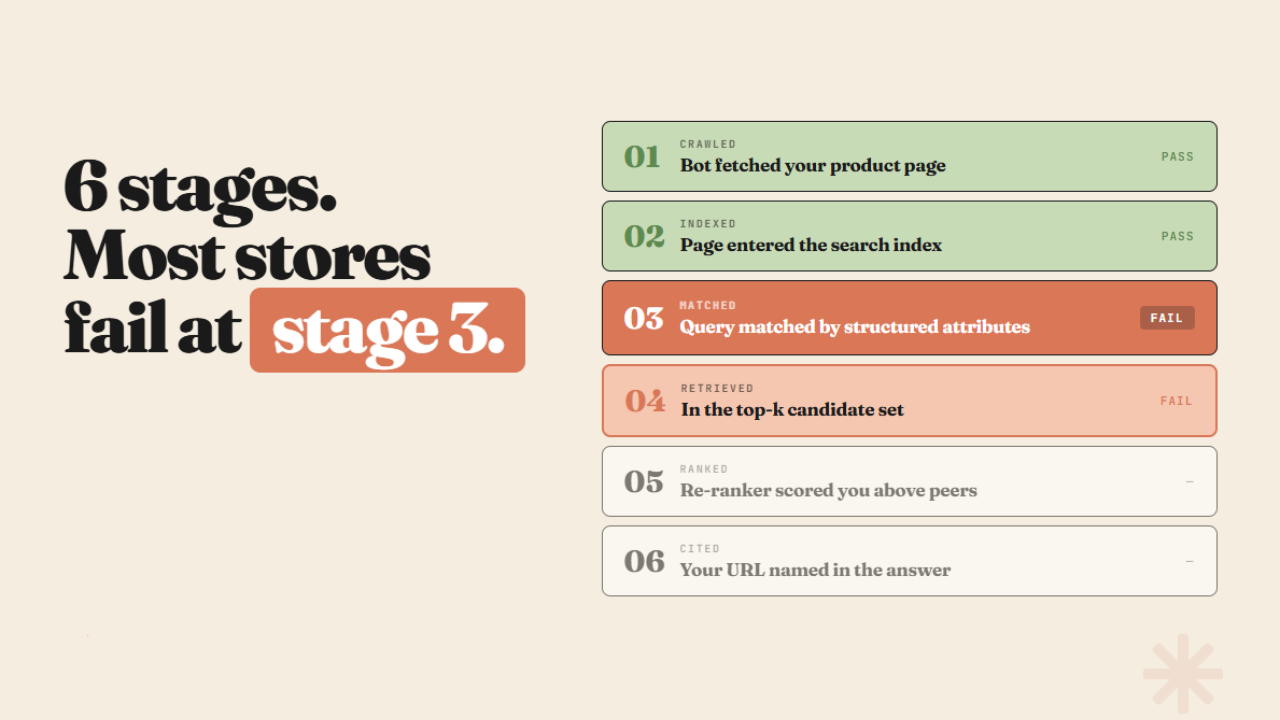
The pipeline most merchants don't know exists
When a shopper types something into ChatGPT - "best lightweight running shoes for wide feet," "natural SPF moisturiser for sensitive skin" - what happens next is not a search. It's a pipeline, and your store has to survive every stage of it to get named in the answer.
Brands think about AI visibility the way they think about Google - get your content right, get your reviews up, show up. That mental model misses four stages that happen before ranking is even relevant.
There are six stages between a shopper's query and your store being named in the response. Most stores drop out at stage three or four and never know it.

The six stages, and where stores actually fail
Stage 1 - Crawled
A bot fetches your product page. GPTBot, ClaudeBot, PerplexityBot - each platform sends its own crawler. If your robots.txt blocks them, or your theme renders product content behind JavaScript that crawlers can't execute, the page never enters the system. You don't exist yet.
Fix: check your robots.txt explicitly for GPTBot and PerplexityBot. Most Shopify themes render cleanly for crawlers, but some apps and cookie consent layers block access without you knowing.
Stage 2 - Indexed
The page entered the index. This is not the same as being crawled. A page can be fetched and still not indexed if the content is thin, duplicated, or structured in a way the system can't parse cleanly. This is also where entity classification happens - the system assigns your product to a topic and category during indexing. If it misclassifies you here, you enter the wrong candidate pool upstream of everything that follows.
Fix: your Shopify taxonomy category assignment feeds directly into how AI systems classify your products during indexing. A wrong or missing category means misclassification at this stage.
One more thing that happens at this stage: the model fans a single query into three or four sub-queries before retrieval begins. "What are good quality sheets that don't cost too much?" becomes "best affordable sheet sets", "high quality budget bed sheets", "cotton sheet sets under $50" - three independent retrieval passes. Thin content fails against all three at once.
Stage 3 - Matched
The query runs, and the system looks for products whose attributes match the semantic intent behind it. This is not keyword matching. A shopper who types "something for dry skin that won't clog pores" will match a product titled "non-comedogenic hydrating serum" if the structured attributes are there - skin type, concern target, formulation - because embeddings match meaning, not words.
If those attributes are empty, there is nothing structured to match against. Your product title and a block of copy are what the system has to work with, and copy is hard to match precisely because it was written for humans, not for structured retrieval.
This is where most stores drop out.

Stage 4 - Retrieved
You made it into the top-k candidate set - the shortlist of products the system will actually reason over. Getting here requires passing stage three cleanly. The size of the candidate set is usually between 5 and 50 products, depending on the query and platform. Everything outside that set is not considered, regardless of how good the product is.
The practical implication: if your structured attributes are incomplete, you are competing for a spot in the candidate set with products that have complete attributes. The system ranks by confidence, and a product with clear, filled structured fields gives the model more to be confident about.
Stage 5 - Ranked
The re-ranker scores candidates against each other. At this stage, copy quality, review signals, description completeness, and image count all start to matter. This is the stage most merchants try to optimise first - better copy, more reviews, richer descriptions.
Those improvements are real and they help. But they only matter if you made it to stage four. Optimising stage five when your problem is stage three is the most common AI visibility mistake Shopify merchants make.
Stage 6 - Cited
Your URL is named in the answer. Getting here means clearing all five previous stages. It also means the re-ranker decided your product was the most confident, specific answer to the query among the candidates it had.
What the diagnostic looks like in practice
A skincare brand with strong conversion, 400 reviews, and well-written PDPs. Not showing up in ChatGPT for queries in their category.
The audit finds: taxonomy category unassigned on 60% of products, skin type and concern target fields empty across the catalog, SPF and active ingredient fields blank on every sunscreen product.
The brand is dropping out at stage three. The re-ranker never sees them. The reviews and copy are irrelevant at that point because the structured matching layer has nothing to work with.
Thirty seconds per product to accept Shopify's taxonomy suggestion. The ACP fields auto-populate once the category is assigned. Stage three clears. Stage four becomes possible.

Filling the fields at scale
Manually reviewing and assigning taxonomy categories and structured attributes across hundreds or thousands of products is where most merchants stop.
Catalog Genius handles this automatically - enriching your product catalog with the structured attributes, taxonomy assignments, and metafield data that make retrieval possible at stage three and four. The same structured data that feeds Shopify's agent pipeline feeds every UCP-compatible surface that reads your catalog.

- Ankit
If this was useful, the next one will be too.
Weekly. Free.
Unsubscribe with one click.
