Claude can now pace your Black Friday ad spend
a four-line brief every morning
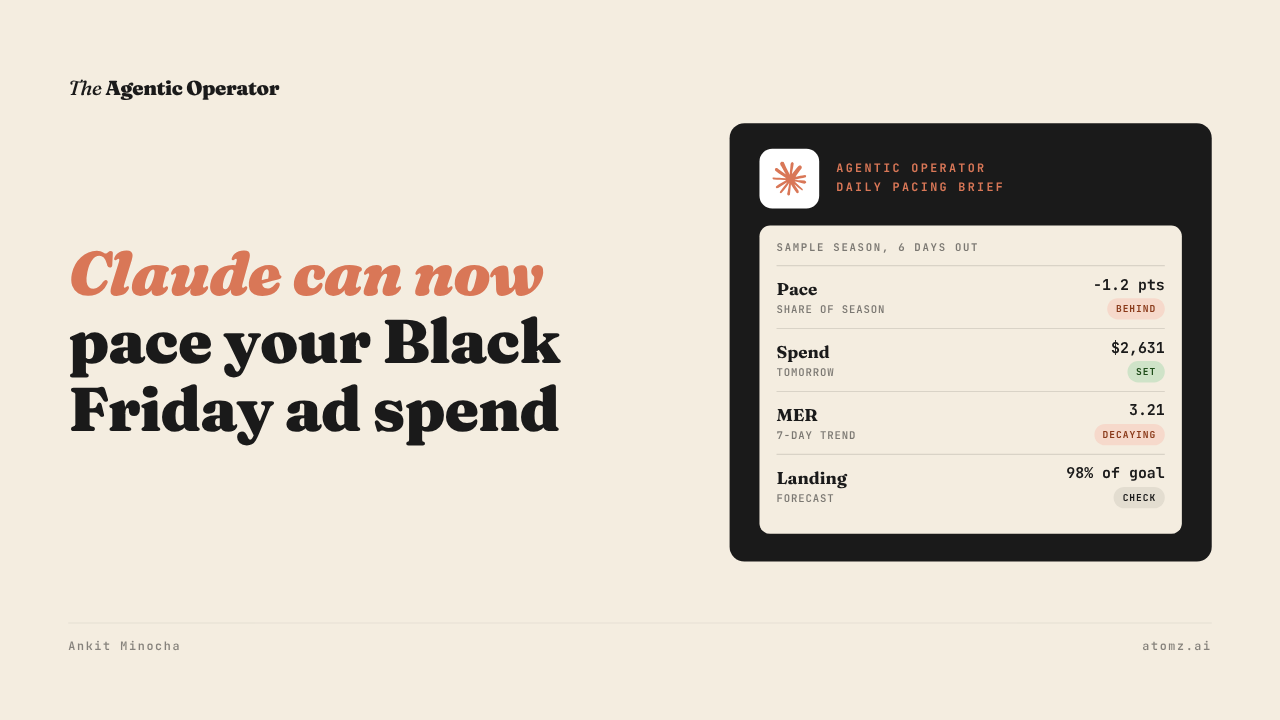
Black Friday is this Friday. The five days from Thanksgiving to Cyber Monday carry a big part of the season.
That's also when ad budgets get decided one day at a time, often off yesterday's numbers. It's easy to miss that you're behind your goal or that one channel is taking more than its share until the weekend is over.
So I added a pacing section to The Agentic Operator skill, the free Claude skill for Shopify operators. You give Claude last year's daily revenue and ad spend, plus this year's so far. Each morning you type one command and it tells you whether you're on pace for your goal, what to spend tomorrow and what to fix first.

Source: The Agentic Operator skill
Why it counts days to Cyber Monday
Cyber Monday was December 1 last year. This year it's November 30.
So November 24 last year sat seven days out from Cyber Monday. This year it sits six. The skill lines both years up by days to Cyber Monday, so every day is compared with the same point in last year's run-up.
One command each morning
Once the skill is set up (steps at the end), type "am I pacing" in Claude. It gives back four lines. Where the season stands, tomorrow's budget, the one thing to do and the next command to run.
I ran it on a sample season, a $335,000 revenue goal on $103,000 of ad spend, set to the Tuesday before Black Friday.

Source: The Agentic Operator skill, run on sample numbers
The brief said the season was a little behind plan and on track to land at 98% of the goal. Season MER, revenue divided by ad spend, was 3.21 while the daily number had slid from 3.26 to 2.85 over the last week. The one thing to do was find the gap before adding more budget.
Its next command, "find my soft window", found where the gap came from. The last six days spent 12.6% more than the same days last year but brought back less per dollar, so it suggested cutting $1,213.
Then "channel drift" showed which channel took the extra spend.

Source: The Agentic Operator skill, run on sample numbers
TikTok had taken 14.5% of spend against a 12% plan, so the skill suggested moving $1,003 of it to Meta.
The budget for the next day came out at $2,631. It spreads what's left of the goal across last year's daily curve instead of splitting it evenly, since Black Friday and Cyber Monday carry far more than a normal November day.
The commands for this week
Type these in the same Claude chat, after /the-agentic-operator.
1/ "am I pacing" every morning for the four-line brief.
2/ "what do I spend today" for one budget number for the day.
3/ "find my soft window" and "channel drift" when the brief says behind, to see where the gap is and which channel is over its plan.
4/ "where do I land" for a revenue forecast with a range.
5/ After Cyber Monday, "season postmortem", then "build next year's curve".
If something it needs is missing, it stops with one line that names the command to fix it.
What it needs from you
Revenue can come straight from Shopify. Ad spend usually can't, since your ad accounts are rarely connected to Claude.
So upload a CSV for each year with three columns, date, net sales and spend, one row per day. Add one spend column per channel if you want the drift read.
Then set the season once with "set my season", Cyber Monday as the anchor, your revenue goal and your spend goal.
How to set it up
1/ Download the skill file - Get it here
2/ In Claude, add it under Customize > Skills > Add > Upload a skill.
3/ Connect your Shopify store under Settings > Connectors, so Claude can pull revenue.
4/ Open a new chat, type /the-agentic-operator and say "set my season".
5/ Upload both CSVs and say "load my numbers". From tomorrow, start each morning with "am I pacing".
The pacing prompts sit in The Agentic Operator skill next to the catalog, email, ads and security prompts. Download the skill for free →
As more shoppers ask AI before they buy, it helps to know which products it picks. The Shopify Catalog audit shows which products AI recommends for your queries and which it skips. See which products AI picks →
Atomz AI fills the gaps in your product data, so the pages your ads land on answer what shoppers ask. See it on your catalog.
- Ankit
If this was useful, the next one will be too.
Weekly. Free.
Unsubscribe with one click.