What Shopify's Spring '26 Editions changed in your catalog
Shopify's Spring '26 Editions covered a lot.
But what changed for your catalog specifically comes down to 3 things.

1 - Shopify is deciding what agents receive about your products
Eligible products on Shopify are now automatically indexed into the agent network and sent to ChatGPT, Copilot, and Gemini without you doing anything.
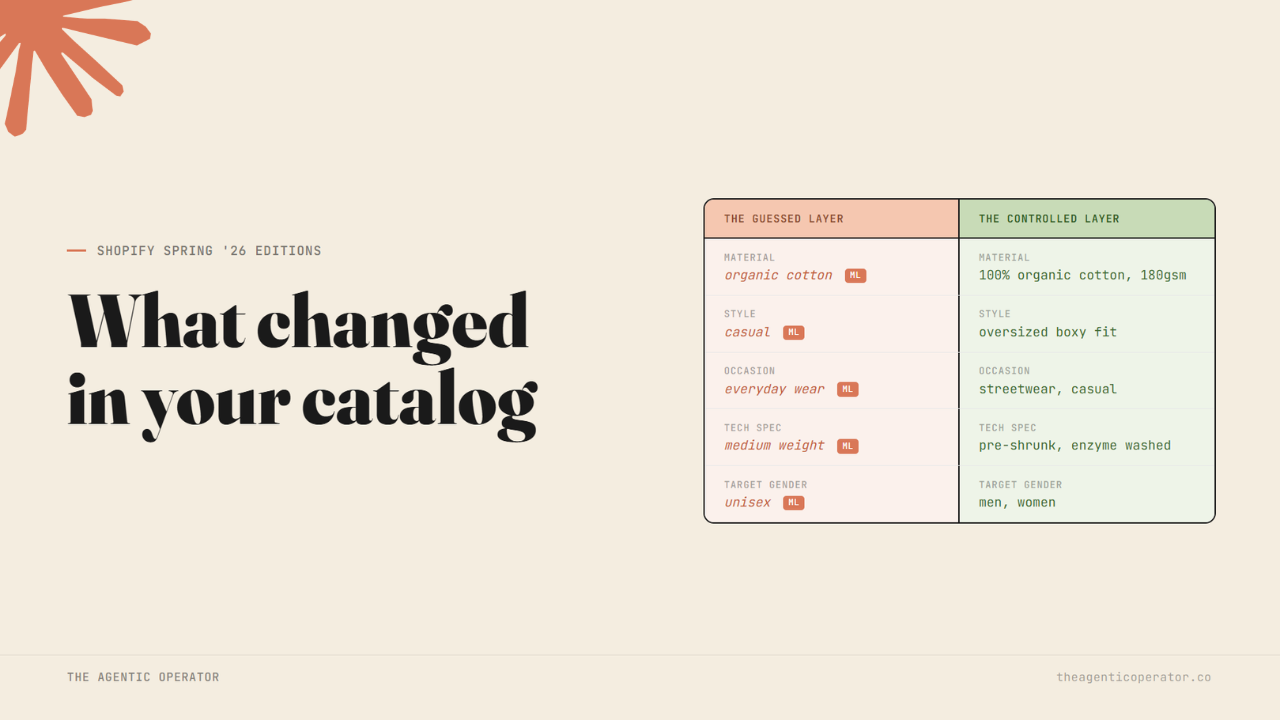
That part is straightforward. What most merchants don't know is what happens to the empty fields in that payload. The Global Catalog Extension attaches an inferred metadata block to every product response. When an agent retrieves your products, it receives not only the fields you filled in but also a set of auto-generated attributes that Shopify derived from your existing product data - material, style, occasion, tech specs, and selling points - with what Shopify's own documentation calls 'varying' accuracy.
If you haven't filled your product metafields, agents are working from Shopify's guess. If your description is thin, the guess will be thin and sometimes wrong - a skincare product categorised as fragrance-free when it isn't, a shoe matched to the wrong use case. The agent doesn't know the difference.
When you fill a metafield yourself, your value overrides the inference. Empty means Shopify decides. Filled means you decide.

Go to your product admin and check the following -
Open any product and scroll to the metafields section
See the attributes your Standard Product Taxonomy category has unlocked - these are the fields agents read while matching your product
If they are empty, Shopify filled them - you have no way of knowing whether that inference is accurate without checking
If they are filled, confirm that what you see reflects what you would actually write
2. Three attributes filter - the rest only rank
The auto-generated attributes and your filled metafields both go into the catalog payload. That part is working. The current limit is on the agent side.
When an agent searches the Shopify Catalog with a filter, only three attribute names are currently supported as server-side filters - Color, Size, and Target gender.
Material, style, occasion, ingredients, and fit - all of these are in the payload and affect how your product ranks, but an agent cannot use them as hard filters today. If a query maps to material or occasion and the agent applies a filter on it, your product is not in the filtered result set, regardless of how good your catalog data is.
This is the current state, and also the earliest version of that filter list. Filling those attributes now matters because when filtering expands, the brands with structured data already in place are the ones that surface first. Brands that fill them retroactively will be doing it at the same time as everyone else, on a mechanism where competitors have been ranking on that data for months.
3 - The admin preview only shows you layer one
The Agentic section now shows a per-product search preview alongside five Listing Quality signals. Useful - but with a specific limitation that Shopify calls out.
Agentic storefronts often re-rank results based on their own logic, so what's displayed in the preview might differ from what customers view in the actual AI experience. Use this tool as a directional signal, not an exact prediction.
There are two layers. Shopify ranks your products against the query first - that is what the preview shows. ChatGPT, Copilot, and Gemini then take that ranked list and apply their own re-ranking logic before the shopper sees anything.
More details about the first layer → Check the last issue
If your products rank well in the preview, that is a necessary condition for appearing in AI results, not a sufficient one. Layer one is the gate. Layer two is the agent's call, and you don't control it - you influence it by how well your structured data is in layer one.
Run a free catalog check that shows which fields are being inferred and which are filled with your data. This determines what agents receive from the Catalog API.
Closing the gap between what you published and what agents receive is what Atomz AI is solving for brands like LEGO, Panini, and more.
- Ankit
If this was useful, the next one will be too.
Weekly. Free.
Unsubscribe with one click.
