Where AI agent sales show up in Shopify and Google
and why Gemini visits land in Direct
Google now has an Analytics tab in Merchant Center for checkout in AI Mode and Gemini. Google's guide to it was updated last week.
That makes three places to look for sales from AI agents. Shopify's admin, Google's Merchant Center and your own analytics each see a different part of it.
What each one can count depends on where the shopper paid. A shopper either pays inside the AI or clicks through to your store.
Orders paid inside an agent's chat
Google AI Mode, Gemini, Microsoft Copilot and Meta's Muse can take payment without sending the shopper to your site. Shopify calls this direct checkout.
The order still lands in your Shopify admin like any other.
Your site never loads, so browser pixels can't see the sale.
Last month I shared what fires on Google's checkout. Only two server-side events do, checkout started and checkout completed.
So Shopify's own report is the first place to look. Go to Sales channels > Agentic and click a channel to see its sales, orders, sessions and conversion.

Source: Shopify Help Center
The sales number counts both kinds, direct checkout plus visits that bought on your site. These reports aren't available for headless stores yet.
Google's new Merchant Center tab
The tab sits in Merchant Center under Settings > UCP integration > Analytics. You need the Performance role to see it.

Source: Google for Developers
It splits Google's side into two reports.
Native checkout shows Buy button clicks, purchases, order value and cancellations. Cart transfer counts clicks that send a Google cart to your store.
Google stops tracking once a cart reaches your site. From there the order lives in Shopify and your own analytics.
The same numbers come through the Merchant API as an alpha report, if you pull data into a dashboard.
Visits that land on your store
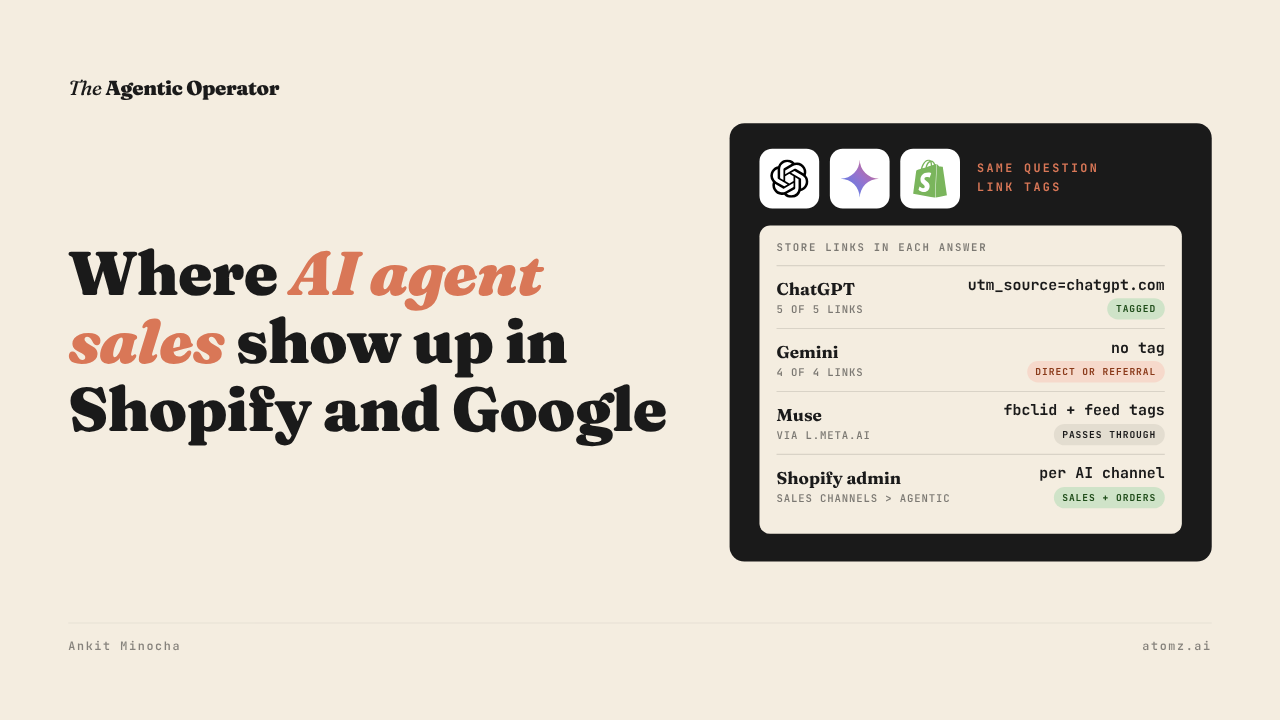
When an AI links a shopper to your store, what the link carries decides how your analytics labels the visit. I asked ChatGPT and Gemini the same question and checked every store link in both answers.

Source: ChatGPT and Gemini
All five ChatGPT links carried utm_source=chatgpt.com.
None of Gemini's four links carried a tag.
Search marketers reported that Gemini stopped tagging its links about a month back. They also found the Gemini iPhone app sends no referrer, so those visits land in Direct.
In my Muse test, store links went through Meta's own link at l.meta.ai and picked up an fbclid. Tags already in the store's Meta product feed came through too. Links from Shopify Catalog carry utm_source=shopify and utm_medium=catalog.
Four checks for your AI sales reports
1/ Go to Sales channels > Agentic, set the last 30 days and open each AI channel. Note which ones show orders and which show only sessions.
2/ If your products sell in AI Mode, open Merchant Center > Settings > UCP integration > Analytics. If you can't see the data, ask your account owner for the Performance role.
3/ In your analytics, look for utm_source=chatgpt.com and for gemini.google.com as a referrer. Search marketers reported ChatGPT links missing the tag for a week in mid-October, so check Direct for that week.
4/ Add your own UTM tags to the product links in your Meta feed. Muse passes them through, so its visits carry a name you chose.
Our free catalog audit shows which shopper queries bring up your products in the Shopify Catalog API and who shows up if it’s not you. Audit now →
Atomz AI fills in category attributes across your catalog, so AI agents can match your products to what shoppers ask. Get in touch for a demo.
- Ankit
If this was useful, the next one will be too.
Weekly. Free.
Unsubscribe with one click.